Since his paper was turned upside down, he decided to turn the mailbox upside down to match his paper. But since there is a piece of wood through the top of the box, it would break. But, since its a cartoon, he is able to turn it with no problems. Which could be possible, but it would not be on the wooden bar anymore, and it would be REALLY hard to do.
Shuffling Sandwich
In this the goose is shuffling the meat into the bread, which flattened before he did it. He is able to shuffle the two things into each other and then grow a few feet tall after he was done. Which you would be able to shuffle bread and meat together, it wouldn't be as easy unless you smash the bread a lot, but then again it still wouldn't grow to full size.
Sandwich in throat
When the goose eats the sandwich, you can see it go down his throat and his neck expands. In this cartoon, his neck is flexible and he can even put his head into his shirt. Which you could see a little bit when we swallow, but not the whole sandwich, and our throats don't expand that much to fit food, we would choke.
Sucking peas
In this, the goose is sucking peas from a plate across the table into the straw. He has a strong enough suction power that he can pull peas toward him form far away. As this may be possible, it would take a vacuum amount of suction power to do it, it not physically possible for a human or any animal to do so.
Spaghetti knitting
Before the goose eats the spaghetti, he knits all of it into a sock really fast then eats all of it. The goose is a really fast knitter and can eat the large amount of spaghetti fast too. It probably is possible to knit a sock from spaghetti, but you would need a lot more spaghetti and it would take longer, it would not be as easy as the goose made it.
Responsive design is the design that responds to the users screen, whether if its a mobile phone, tablet, pc, or a mac. As it switches to a laptop or to a iPad, it should automatically switch to their resolution. It is more important now with so any different kind of devices that are coming out and they need to adapt to the size of all of them.
CSS Difference
In my website I had to change the CSS, I had to add media queries and breakpoints:
@media only screen and (min-width:768px) and (max-width:1024px) {
.TABLETstylesSTARThere {
}
These change so that the width of the page will change when the size of the screen is smaller and adjusts the text so that it all fits on the screen.
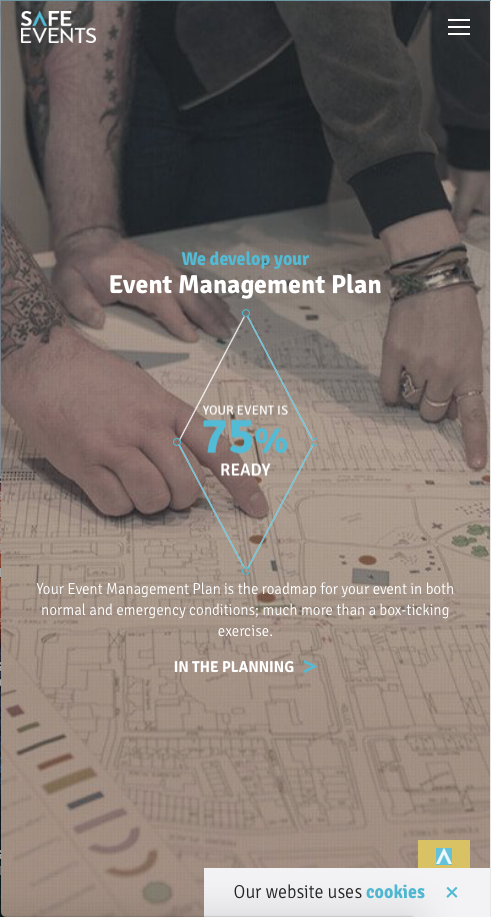
This is the normal page size on the website on a mac.
What is responsive web design?
Responsive web design is when a website becomes compatible with all devices from macs to windows, to smart phones. The website will automatically switch to your screens resolution and if the screen is minimized then it will adapt to the new resolution. This will eliminate the need for having to make a different design for each kind of device. Not only does it adjust the resolution, but also automatically resize the images.
This is the wide view of the same website, you can't see all of the photo, but the text and the diamond adapted to the width of the screen.
Why is it important?
Responsive web design is more relevant now because there are more different kind of devices that websites are being looked on. Also more mobile phones are being used to look online and the websites need to change resolutions to the size of the device.
What are media queries?
This photo is stretched upwards and there is less photo on the sides and the diamond and text both adapted to the size of the screen.
Media queries are what change the sizes of all things if on a smaller device. The code sets a width so that if it is smaller than the resolution set, it will change the sizes of all the images and text. You can also change the color of the text, background, and width of all the tabs on the page. It will adjust to a computer, tablet, or a phone, depending on what the media queries are set to. Breakpoints will change the change how the behavior acts on both sides of the breakpoint, and will also change the shape of the tabs if there are any.
Flash was a new and exciting software for websites to get animations and games on their site. It allows the web to have more interactivity and make websites more appealing to users. It was the first step to adding design to websites and Flash was able to run on all computer and browsers, as long as the
y had the Flash Plugin installed. Flash guaranteed that the content would run the same for anyone who loaded it, regardless of the computer or browser they were using. After a while a computer would have to have the Flash Plugin because it was so common on websites.
The Fall
The fall started by 2007 because Apple decided not to support the plugin when they introduced the Iphone, and about the same time, the fifth version of HTML was about to be released and would replace some of the functions that Flash did. After a while, websites started to use HTML 5 more than Flash, causing the fall of Flash. In 2010, Steve jobs wanted the Apple site to rely more on HTML 5. The biggest site still using Flash to today is Facebook, with their Flash games, they are attempting to change the browser games to be able to play on mobile but was given up by 2011. YouTube used to be run by Flash Player and was th ebest way to watch videos. HTML 5 was slowly taking over the web.
Adobe Software
In 2011, Adobe released a new software called Edge Animate, and it was the new way to create HTML 5 content. Also making HTML 5 the better solution for making content for browsers across mobile platforms. YouTube announced in 2015 that they were now going to be run play HTML 5 video player. A few months later, it was exploited that hackers were into the Flash Player and Facebook told Adobe that they had to set an "end-of-life" date for the plugin. They then discontinued Edge Animate at the end of 2015, and changed the name to "Animate CC".
Modern Flash
The last major company still using Flash to today is Facebook, over 650 million people are still playing the Flash-based games on the website. For years, Facebook as been trying to convert so that their games are playable on mobile devices, but was eventually given up in 2011. Google announced recently that they will be blocking Flash by default in Chrome, making it hard to play Flash games or watch Flash videos. Internet Archive websites are trying to save Flash Websites so that people can view Flash content before it goes extinct on the web. Today, people are still arguing over if Flash should be blocked on all platforms and browsers all together.
For my topic, I decided to choose Paris, and make a tour guide for people who want to learn more about landmarks and if they would ever want to go there, and you can see it here! This website was created in Dreamweaver, it took me about a week to create it because there are a lot of pages I had to create and find information on. Along the way I found a few new things that I will be doing from now on, like, instead of making a new CSS, I just need to copy and paste one from a previous page so that I don't have to recreate all the colors and the width to be the same. If I had more time, I probably would have done a better color scheme for the background, but it still turned out ok and easy to read. It is a simple and easy to navigate through and I will do the same for all my websites, I hate going on websites that are overcrowded with things, that I don't even know where to go. Picking a color scheme is hard, so that they all go with each other and so that the text is easy to read, but this websites color scheme turned out pretty good.
This pen was made in the program Maya, and was created in 3-D. When creating this pen I learned how to use soft scaling, which is how I made the grippy and the clip. I picked this project because I spent quite a bit of time on it and it summed up my whole semester on what I learned, and I got better throughout the semester. My strengths for this project are that I got a lot of the small details in the pen and tried to get the colors the same. I have improved on using the right material for making the colors on it, like how phong is more shiny, and Blinn is more dim but has a small shine to it, which is what I made my pen color out of. Next year, I will probably be using the soft scaling and the materials a lot for different kinds of projects. I could improve one thing it would be the tip of the pen, after finishing it I saw that I forgot to add the ink on the tip of it. I am very proud of this project because I spent a lot of time getting the small details.
Character Story
This animation probably took the longest out of all of the projects, because I was still learning how to use After Effects. When making this project I learned how to move a character and the background at the same time, and also how to parent a shape to another shape. I picked this project because this was my biggest project throughout the whole year and took me a few weeks to make. My greatest strength through this project was that I did a lot of trial and error to try and make the animation run smoothly. There was a few mistakes in it still, because I was still learning. Like when the screen was scrolling the character was moving slower than the background and the robot steps onto the other robot, but it was mostly because I was running out of time to fix it. I probably wont be using After Effects a whole bunch now that I am learning how to use Maya, but if I do, I will use what I learned on how to make a walking cycle or how I scrolled the background on my next project. If I could change something, i would fix the small mistakes and put more detail in the background of the animation to make it more appealing.
Ice Cream
This was my first animation, before I was just learning how to model in Maya, and I still am learning how to model. I had to ask for help quite a bit for the animation but now I get it better, it was my first time so it was a little confusing to learn at first. I picked this project because it was my first 3-D animation in Maya and I spent a long time created the ice cream and the other models. My strengths in this project are that I tried to get the right material on the ice cream to make it look like a real scoop of ice cream. I will be using what I learned on how to animate it in the future, like how I put objects into the same group so that they all spun together at the same time. If I could change something I would fix the material in my animation, in the animation the cloud texture spins with the table and it looks like the scoops are spinning, but i didn't have time to fix it.
Multiplane
In this animation, I was learning a new skill, which was how to make a background with different layers to scroll and move at different speeds. I picked this project because I spent a long time created the backgrounds and it turned out good in the end. This animation was also created in After Effects, but the backgrounds were made in Photoshop. My greatest strengths in this project was the detail I put into making the backgrounds, and I don't see any mistakes in the animation. I already used what I learned during this animation in my character story, this helped me a lot.
Walking Animation
This animation was my 3rd animation made in After Effects, and I learned how to make a walk cycle. I picked this project because I did pretty good on the animation and I spent a lot of time making the robot, it was first hand-drawn. My strengths in this project was that I had to do a lot of trial and error on this one too, to make the walk look real and run smoothly. I have used what I learned on this project for the character story, and I probably use it again if I use After Effects. If I could change anything in this animation it would be that I fix the two specks that are moving with the head by the robot, I don't think I noticed them until I rendered it out, but again I didn't have enough time to go back into it to fix it.
Wallace and Gromit is a British, clay animation that was started out by a comic in 1982. The first short movie was made in 1989, and it was a stop-motion animation film, called A Grand Day Out. Stop-Motion takes a really long time to make, Wallace and Gromit are made out of clay, and they move the clay a tiny bit, then take a picture, they do that over and over again until they have the full animation. That is why the animation is only 24 minutes, each character moves 12 times a second. The company said that when Gromit is wagging his tail for 30 seconds, that it is 360 movements they have to do. One of their newest animation called "A matter of Loaf and Death", it took 18 months to complete.
Apply
Wallace and Gromit does a really good job at making a stop-motion animation smooth and getting enough frames per second. Stop-motion takes lots of patience, their first film took nearly 7 years to complete. If I was to ever create a stop-motion film, I would try to follow the rules that Wallace and Gromit went through, to have up to 12 frames per second.